Real Aviator Game Online: Interface Guide
Press every button in the free demo
The frame loads Spribe's own demo server when you press the button below. It runs in fun mode with a play balance of 30,000.00 EUR, so you can try each control this tour describes without signing up. Nothing you win in it is paid out or can be withdrawn, and the page is meant only for adults aged 18 and over.
 DEMO · FUN MODE
The real game, region by region
Press start in the frame above and a lot arrives at once: a FUN MODE banner, a play balance of 30,000.00 EUR, a row of numbers across the top, a wide flight area, a bet panel with a green button and a column of other people's bets. This page takes that screen apart one region at a time, so the real aviator game online stops looking busy and starts looking like a handful of controls, each with one job. Everything below was checked in Spribe's own demo on 13 October 2026. Casino versions run the same game, but operators set their own limits, so a few numbers can differ.
Top of the screen: banner and history strip
The FUN MODE banner above the play area is the quickest way to know which version you are looking at. In fun mode the balance is play credit, and none of it can leave the game. If you ever open a copy of Aviator and cannot tell whether real stakes are involved, the absence of that banner is the first clue.
Along the top runs a strip of multipliers from recent rounds. Many people read it as a pattern to follow. It is not one: each crash point is fixed by a provably fair generator before the round begins, so the strip is a record of the past, never a forecast. It is useful for one honest purpose, which is seeing how often a round finishes early, sometimes right at 1.00x.
The flight area and what its numbers mean
The centre of the screen is where each round plays out. Bets go in before take-off. Then the multiplier starts at 1.00x and climbs while the Lucky Plane rises along a red curve. If you press Cash Out while it is still flying, your return is the stake multiplied by the number showing at that instant.
When the plane leaves, the area shows FLEW AWAY! next to the final multiplier, and any bet not yet cashed out is lost. For a newcomer that message is the thing to watch, because it tends to come sooner than expected. In the aviator crash game nothing on screen hints at the end in advance; a curve at 1.3x looks identical in a round that stops there and in one that runs far beyond it. Spribe lists the game's return to player as 97%, an average spread over a very large number of rounds that says nothing about the flight in front of you.
The bet panel: stake, Bet, Cancel, Cash Out
Below the flight area sits the bet panel. You can set the stake three ways: the minus and plus buttons nudge it, the quick buttons 1, 2, 5 and 10 jump straight to those amounts, or you can tap the field and type a figure. In the demo the stake starts at 0.10 EUR, which is also the lowest bet allowed.
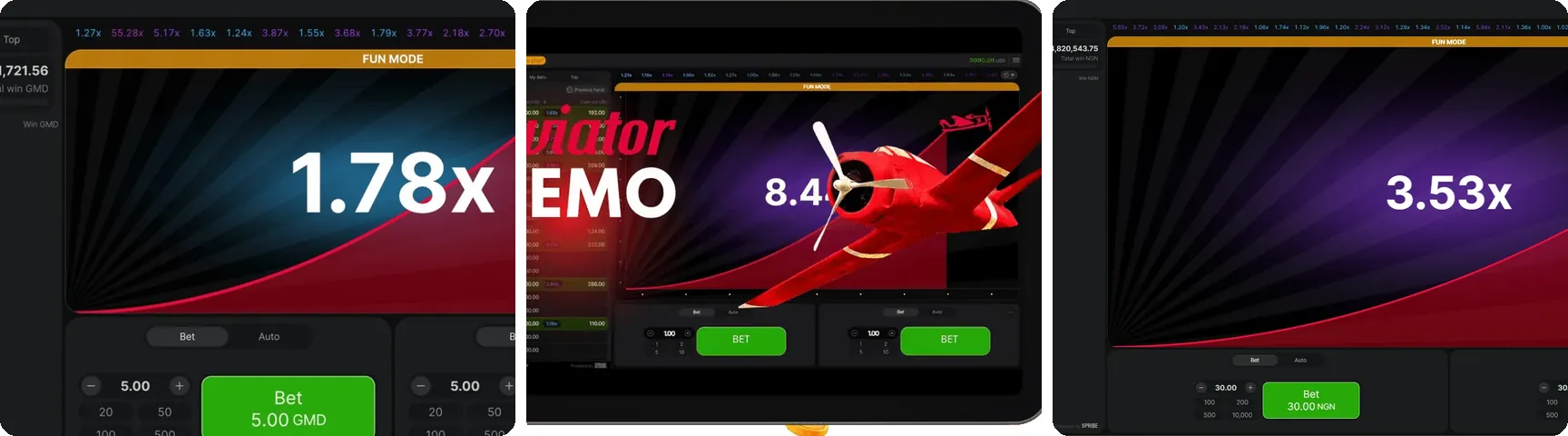
The large button changes role as the round moves on. Before take-off it reads Bet. Once pressed it turns into Cancel, which takes the bet back as long as the round has not started. During the flight it becomes Cash Out. In the screenshot strip on this page that is the green button turning orange, a colour change worth learning, since your thumb will look for it in a hurry.
A second panel and the Auto tab
A small plus icon on the first panel adds a second bet panel. The two are independent: separate stakes, separate buttons, separate cash outs. You can hold one bet for a modest multiplier and leave the other in the air, and in the demo this is the clearest way to see how one flight treats two different decisions.
Each panel has an Auto tab with two separate settings. Auto Bet places your bet for you round after round. Auto Cash Out closes the bet at a multiplier you enter, say 1.50x, provided the plane is still flying when the curve gets there. People mix the two up, so it helps to remember that Auto Bet on its own still leaves the cash out to your finger.
Live Bets, Previous and Top
The column of names and stakes is the Live Bets panel. On a desktop it sits on the left; on a phone it drops beneath the bet panel. It lists everyone's bets in the current round, which is why the real aviator game online feels like a shared room rather than a private machine. Spribe itself calls Aviator a social multiplayer game, and this panel is where that shows.
Two neighbouring tabs change the view. Previous shows the bets of the last round, and Top lists the biggest wins and multipliers. In Top and in My Bets there is a small icon that opens a fairness check for a finished round. At the foot of the panel two lines are worth reading once: Provably Fair Game and Powered by SPRIBE. A version that lacks them deserves a question about where it came from.
Spribe also lists an in-game chat, Live Statistics and Rain among the game's features. Rain drops free bets into the chat at random moments, and they are taken with a claim button.
The menu, entry by entry
The menu holds the settings and the paperwork. In the demo it contains the following entries:
- Sound, Music and Animation – three toggles you can switch off one by one.
- Free Bets – bets granted by an operator or collected through Rain.
- My Bet History – a record of your own past bets.
- Game Limits – minimum bet, maximum bet and the largest win for one bet: 0.10 EUR, 100.00 EUR and 10,000.00 EUR here.
- How To Play and Game Rules – a short guide and the full rules text.
- Provably Fair Settings – where the fairness settings can be viewed or changed.
- Avatar – the picture shown beside your name in Live Bets.
Game Limits deserves a second look, because the maximum win is a ceiling on each single bet, not a target. Operators configure these numbers, so a casino build may show figures that differ from the demo's.
Two rules the screen never shows
Some behaviour lives only in the rules text. If your connection drops while a bet is active, the game cashes it out automatically at the multiplier showing at that moment. If the game itself malfunctions, affected bets and payouts are void and stakes go back to the players. Spribe says its games are built for budget devices and low-bandwidth connections, which helps on a weak mobile signal, but no game can carry on through a dead one.
Where the screen ends and Indian law begins
The demo is the only form of the game this page opens, and that matters for readers in India. The Promotion and Regulation of Online Gaming Act, 2025 and its Rules have applied since 1 May 2026. They forbid offering or advertising online money games and stop banks and payment systems from handling payments for them. A forwarded aviator game link that promises cash play leads straight into that territory, which is why this guide names no operator.
One last practical point. The interface makes quick play easy, with Auto Bet and the history strip doing much of the thinking for you. If you try the demo, decide beforehand how many rounds or minutes you will give it and stop when you reach that point. This page is for adults aged 18 and over.
Demo loading: The Spribe demo frame loads only after you press the start button. Before that, no game server is contacted.
No account: There is no registration, login or sign-up form anywhere on this site.
Play credit: The 30,000.00 EUR demo balance is play credit. It cannot be topped up, and nothing in it can be withdrawn.
No payments: This page takes no payments.
E-mail contact: If you write to the support address, the message is used only to reply to you.


How the interface scores
What works
- One button handles Bet, Cancel and Cash Out, so the controls stay compact
- Game Limits shows minimum, maximum and the per-bet win cap in one place
- Live Bets moves under the bet panel on phones instead of being dropped
What to keep in mind
- The disconnection rule appears only in Game Rules, not on the main screen
- The fairness icon is small and easy to overlook
- The history strip invites pattern-reading it cannot support
Questions about the Aviator screen
Where is the Cash Out button in Aviator?
It is the same large button you used to place the bet. Before take-off it reads Bet, after you press it the label changes to Cancel, and once the plane is flying it becomes Cash Out. If you are using two panels, each one has its own button, so you can close the bets at different moments.
What do the numbers along the top of the Aviator screen show?
They are the multipliers at which recent rounds ended. The strip is only a history. Each crash point is set by a provably fair generator before the round starts, so earlier results do not shape the next one, and the strip cannot tell you when the plane will leave.
How do I place two bets at once in Aviator?
Tap the small plus icon on the first bet panel. A second panel appears with its own stake field, its own Bet button and its own Auto tab. You can give the two bets different stakes and different Auto Cash Out targets and watch how one flight treats both.
Is the game Aviator laid out the same on a phone and a computer?
The controls are the same, but the arrangement shifts. On a desktop the Live Bets panel sits on the left of the flight area. On a phone it moves below the bet panel, so you scroll down to see other players. On a PC the game runs in a browser tab, as there is no desktop client.
Can I check whether an Aviator round was fair?
Yes. Aviator is provably fair, meaning the crash point is fixed before take-off. After a round you can open the check through a small icon in the Top or My Bets view, and the menu has a Provably Fair Settings entry where the settings can be viewed or changed.
Can people in India still play Aviator for money?
Since 1 May 2026, India's Promotion and Regulation of Online Gaming Act, 2025 and its Rules have been in force. They ban offering and promoting online money games and bar banks and payment systems from processing such payments. The fun-mode demo on this page uses play credit only. This is general information, not legal advice.